Reverse video searchfor TikTok.
Paste a TikTok link or drop the downloaded file. We find where else the footage appears — including the version that was on YouTube two years before it went viral here. Free scan. You only pay if we find something worth opening — you see the price first. No subscription.
- Works with links, downloads, screen recordings and screenshots.
- Each match shows which moment of your clip it matched.
- Also searches YouTube, Instagram, X and the open web.
A link checks the first ~5 seconds. To check the whole video, upload the file.
vm.tiktok.com short links work too
Not a real result — try your own video above ↑ unlock every source, date and full URL — no account needed
From a 9-second repost to the original upload.
Copy the link
Share → Copy link on the TikTok app, or download the file if the account is private to you.
We match the keyframes
Distinctive frames are fingerprinted and searched. Matching uses the whole image, so the TikTok overlay rarely stops a match.
You get the trail
Every page we found with the footage, by platform. Open them and compare dates — the earliest is usually your source.
TikTok reposts don't need a monthly plan.
The clip you are curious about is one search. Most tools want $7.00 a month for it, renewed until you notice.
Top up $5, spend it whenever. Your balance never expires, and a paid search that finds nothing gets 50% back.
- Retrace
- $2.90
- Competitor (1 month)
- $7.00
- Competitor (1 year,
never cancelled) - $84.00
What a real result looks like.
This is an actual results list, not a mockup. We searched the music video for “Never Gonna Give You Up” — footage that lives on TikTok as a sound, a meme and a thousand reposts at once. Personal post titles are blurred.
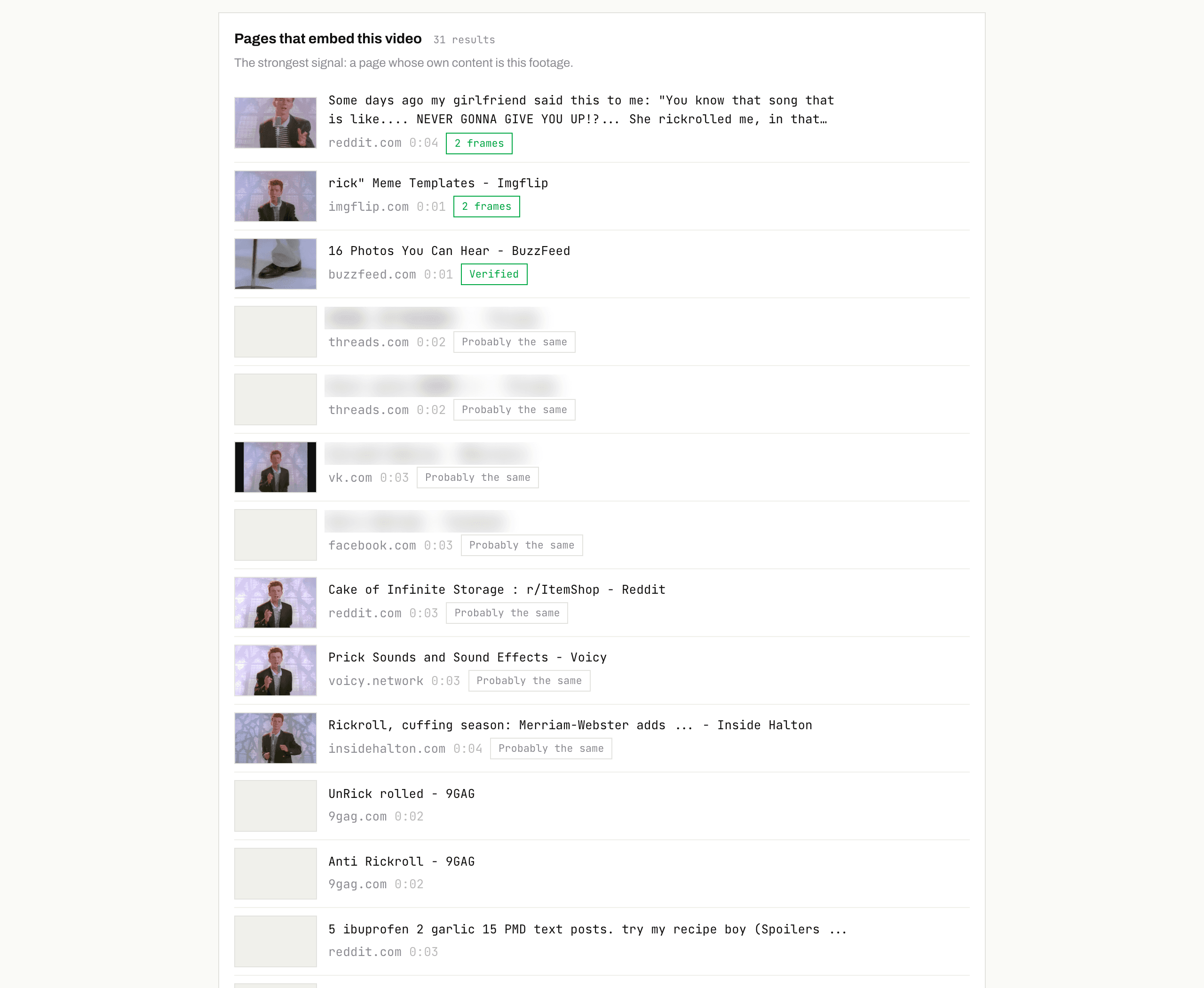
- Verified
- We compared the page's own thumbnail with your frames one by one and they line up. That page carries your footage.
- Probably the same
- Google's image index places this exact frame on the page, but the frame-by-frame check has not confirmed it yet. Usually right; open it and look.
- 2 frames
- The same page came back for two different frames of your clip. The more frames agree, the less likely it is a lookalike.
- 0:04
- The moment of your clip that matched — not a timestamp inside the other video.
For a TikTok, read the list like this: rows that say Verified or match on several frames are the same footage. Open those and compare upload dates. The earliest date is usually the original — and it is often not on TikTok at all.
Retrace vs searching inside TikTok.
TikTok search matches words: captions, hashtags, sound names and usernames. That works when you remember a phrase from the video. A clip with no text, no caption you can recall and a generic sound gives you nothing to type.
Retrace does not read the caption. It searches the frames, so a repost with a new caption, new hashtags and a trending sound still matches the original — on TikTok and off it.
| Feature | RETRACE | TIKTOK SEARCH |
|---|---|---|
| What you search with | the video itself | words, hashtags, sounds |
| Clip with no caption | matches on the frames | nothing to type |
| Reposts with new captions | found | only if words overlap |
| Copies on YouTube, Reddit, X | same search | TikTok only |
| Deleted TikTok | found if mirrored elsewhere | gone |
| Price | free scan · unlock $2.90 | free |
A cross-check once you have the results: if the clip uses an original sound, its sound page on TikTok lists the videos that used it, and the sound is usually named after the account that first posted it.
Original, repost or the full version?
The original
The first upload of the footage. On TikTok it often carries an “original sound” named after its creator. It can just as well be a YouTube video or an Instagram Reel from two years earlier.
A repost
The same footage on another account, posted later. Usually cropped, captioned, sped up or with the watermark of the account that took it. Reposts often have more views than the original — views do not tell you who was first.
The full version
The longer video the TikTok was cut from: a YouTube upload, a livestream, a film or a news segment. The match shows which moment of your clip it came from, which tells you where to look inside the long video.
Why a TikTok may not be found.
No tool can find a page that search engines cannot see. These are the usual reasons a TikTok comes back empty:
Private or friends-only account
Private TikToks are not public pages, so they are not indexed anywhere. Neither are videos limited to friends.
Deleted and never mirrored
Viral clips get copied quickly. A small account's video that was deleted after a day usually leaves nothing behind.
Too new
A TikTok posted in the last few days may not be indexed yet. Search again in a week; your balance does not expire.
Heavily edited
Green screen, a duet split screen, a mirror flip or a tight crop changes the frames. Upload a stretch where the original footage fills the screen.
Only a link was pasted
From a link we search the first ~5 seconds. Download the video or screen-record it and upload the file to search the whole clip.
In our own test (31 October – 2 November 2026), 13 of 61 videos uploaded by users — 21% — were not on any of the three image search engines we checked. Private or never published.
Useful pages elsewhere.
- TikTok: make your account public or private — Why private videos are invisible to every search tool.
- TikTok copyright policy — What to do if the repost you found is of your own video.
Straight answers.
Run the free preview first — it shows how many matches exist before you pay.
Trace a TikTok free →Does the TikTok watermark break the search?
Usually not. We do not remove it, but matching uses the whole frame, so a small overlay rarely hides a copy. Heavy edits can.
Can you find who posted it first?
We return every page where the footage appears. Open them and compare upload dates — the earliest is the likely original.
What about deleted TikToks?
If the clip was mirrored anywhere else — and viral ones always are — those copies still show up.
Do I need a TikTok account?
No, and no Retrace account either for the free preview.
Can I find a TikTok without the username?
Yes. You do not need the username, caption or sound. Upload the video, a screen recording or a screenshot of a frame, and we search the footage itself. The page we find carries the username.
How do I find the original source of a TikTok?
Run the search, open the pages marked Verified or matching on several frames, and compare their upload dates. The earliest is usually the source. If the TikTok uses an original sound, its sound page is a quick free cross-check.
Why does TikTok search not find the video?
Because it searches text. If you do not know a word from the caption, a hashtag or the sound name, there is nothing to match. Reverse video search matches the frames instead.