Check if your videowas stolen or reposted.
Upload your original video and we search several of its frames across TikTok, Instagram, YouTube, X and the open web. You get every public page running the same footage, with its platform, URL and the moment of your video it matched, which is what a takedown form asks for. Free scan. You only pay if we find something worth opening — you see the price first. No subscription.
- Finds re-encoded, resized and moderately cropped reposts.
- Links you can attach to a takedown request.
- Check one video, or top up and sweep your catalogue.
A link checks the first ~5 seconds. To check the whole video, upload the file.
link to your original upload on any platform
Not a real result — try your own video above ↑ unlock every source, page and full URL — no account needed
Your frames, everyone else’s feeds.
Upload your original
The version you posted. We use it as the reference fingerprint.
We sweep the platforms
TikTok, Instagram, YouTube, X, Telegram and the open web in one pass.
You get an evidence list
Platform, page title, URL and match type for each repost found.
Three videos checked, not a year subscribed.
Creators check in bursts — after a launch, after a video pops. Pay for the burst, not the twelve quiet months.
Top up $5, spend it whenever. Your balance never expires, and a paid search that finds nothing gets 50% back.
- Retrace
- $8.70
- Competitor (1 month)
- $7.00
- Competitor (1 year,
never cancelled) - $84.00
What the evidence list looks like.
This is a real results list for a well-known video, the “Never Gonna Give You Up” music video. Swap in your own clip and the rows are the accounts and sites running your footage. Personal post titles are blurred here; yours come in full.
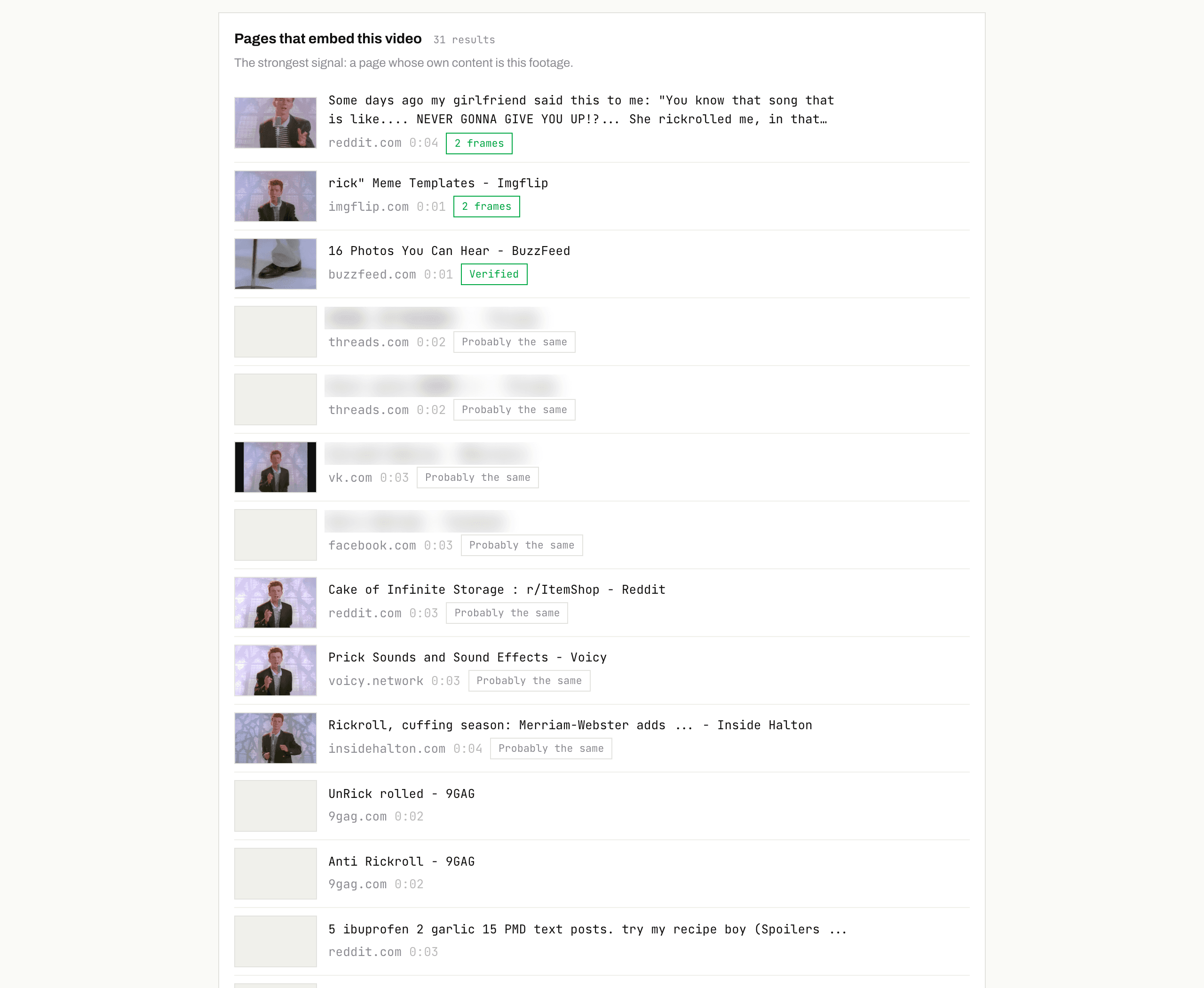
- Verified
- We compared the page's own thumbnail with your frames one by one and they line up. That page carries your footage.
- Probably the same
- Google's image index places this exact frame on the page, but the frame-by-frame check has not confirmed it yet. Usually right; open it and look.
- 2 frames
- The same page came back for two different frames of your clip. The more frames agree, the less likely it is a lookalike.
- 0:04
- The moment of your clip that matched — not a timestamp inside the other video.
For a takedown, start with the Verified rows and the ones matching on several frames: those are copies of your footage, and their URLs are what the report forms ask for. Note the minute on each row — it tells the platform which part of your video was taken.
Retrace vs Google Lens by hand.
A screenshot in Google Lens looks at one frame of your video. Lens shows a sample of pages, and if you are in the shot it tends to return shops selling what you are wearing rather than the repost.
We measured that. On 25 user videos, the first Google Lens visual match was a shop for 17 of them. Searching all 24 frames and keeping the pages that come back for several of them is what finds the actual repost.
| Feature | RETRACE | GOOGLE LENS BY HAND |
|---|---|---|
| Frames searched | up to 24 per scan, all in Trace | one per search |
| Results grouped by page | yes, with frames agreeing | no |
| You in the shot | the page, not your outfit | often shops |
| Moment of your video matched | shown on every row | no |
| Price | free scan · unlock $2.90 | free |
And YouTube's own matching?
YouTube's Content ID and Copyright Match Tool work only on YouTube, and only for the rights holders and Partner Program channels YouTube admits. They do not look at the TikTok account, the Reel, the Facebook page or the meme site.
A Retrace check covers all of those in one search. It is a one-off search, not a monitor: a repost posted next week needs a new search. Your balance never expires, so checking again costs only that search.
Your original, a repost, or an edit using your footage?
Your original
The upload with the earliest date. Keep its URL and date; most takedown forms ask for both the original and the copy.
A straight repost
Your video on someone else's account: matches on most frames, often cropped or with your watermark covered. This is the clearest case for a copyright report.
An edit or compilation
A longer video that uses a piece of yours. It matches on a few frames around one moment. Whether that is fair use is a legal question, not a matching one — but the minute shown tells you exactly what was used.
Why a repost may not show up.
An empty result does not always mean nobody took it. Common reasons:
The repost is on a private account
Private profiles, close-friends stories and closed groups are not indexed by any search engine.
It lives only in the app
Stories, expired posts and some in-app pages never become public web pages. If it cannot be opened in a browser without logging in, no tool can find it.
It is too new
Reposts from the last few days may not be indexed yet. Check again after a launch settles.
It was changed a lot
Mirrored, zoomed, framed in a border or covered in text. Moderate crops and re-encodes still match; heavy edits can slip past.
You pasted a link instead of uploading
A link searches only the first ~5 seconds. Upload your original file to cover the whole video.
In our own test (31 October – 2 November 2026), 13 of 61 videos uploaded by users — 21% — were not on any of the three image search engines we checked. Private or never published. Those were not reposts at all — just videos that only ever existed privately.
Useful pages elsewhere.
- YouTube: submit a copyright removal request — The form for a repost on YouTube.
- TikTok: report copyright infringement — TikTok's form; paste the URL from your results.
- YouTube: how Content ID works — Who gets it and what it covers.
- U.S. Copyright Office: the DMCA — The law behind most takedown notices on U.S. platforms.
Straight answers.
Free preview shows how many reposts exist before you unlock the details.
Check a video free →Has someone stolen or reposted my video?
Upload the version you posted and run the scan. If other accounts are running the same footage, the free scan shows how many and on which platforms; unlocking lists each page with its URL. Compare upload dates on those pages: anything posted after yours is a repost.
Where else is my video posted?
Everywhere we can find it on public, indexed pages: TikTok, Instagram, YouTube, X, Telegram channels with public previews, and the open web. Each result shows the platform, the page title, the URL and which moment of your clip it matched.
Is there a free way to check if my video was stolen?
The scan is free and tells you how many pages carry your footage before you pay. Seeing every repost's link costs $2.90.
Does Google Lens or reverse image search work for videos?
Only on a screenshot, one frame per search, and Lens shows a sample of similar pages rather than every page with that frame. We take the whole video, pick several distinctive frames and search each one.
How accurate is it?
Each match is labelled exact or visually similar with the number of frames that agree. An exact match on several frames is your footage. Re-encoded, resized and moderately cropped reposts still match, and a covered watermark rarely hides one; heavy edits, mirroring and tiny crops can slip past.
Will this hold up for a takedown?
You get the URL of each repost, which is the evidence most platform forms ask for first, plus the page title and the moment it matched. We are not lawyers, and the report is yours to file.
What can't it find?
Private accounts, deleted posts, group chats and anything search engines have not indexed. There is no monitoring yet, so a repost that appears next week needs a new search; your balance never expires, so you can check again whenever you like. If you pasted a link, only the first ~5 seconds were searched; upload the file to cover the whole video.
What happens to the video I upload?
It is deleted one hour after the scan. Results from a search made without an account are kept for 30 days. Nobody is notified that you searched.
Does Content ID find reposts on TikTok or Instagram?
No. Content ID works inside YouTube only, and only for rights holders YouTube admits. For reposts on TikTok, Instagram, Facebook and the open web you need a search that covers those platforms.
Can Retrace monitor my videos automatically?
No. Each check is a one-off search. Run it after you post or when a video takes off; your balance never expires, so a second check later costs only that search.
What do I need for a takedown request?
Usually the URL of your original, the URL of each copy, and a statement that you own the content. The results give you the copy URLs and the moment of your video each one matched. Then use the platform's own copyright form.
Creators also ask.
- Someone reposted my TikTok. How do I find every copy?
- My Instagram Reel was stolen. How do I find who posted it?
- My YouTube video was freebooted. How do I find the copies?
- How do I prove I posted a video first?
- What evidence do I need before a DMCA takedown for a reposted video?
- How do I check if my video is on other platforms without my permission?
- My video went viral under someone else's account. How do I get credit?
- What is the best tool to find stolen or reposted videos?