[ comparison ] updated November 2026

Best reverse video searchtools in 2026 (tested).

Most people searching a video have one clip and one question: where is it posted, and where did it come from? We put Retrace first because it takes the whole video, searches many frames, checks every match against your footage and shows you a free scan before you pay.

Below are the ten tools people compare, grouped by how they work. For each: what it is, what it does with a video, what it costs, and its limits.

We make Retrace, so weigh that. Here is how we tested and the numbers we got. Competitor prices are the ones published on their sites when we checked; where we could not confirm one, we say so.

QUICK PICKS

Quick picks

  1. Find where a clip is postedRetrace
  2. A free first lookRetrace free scan
  3. A clip with a person on screenRetrace
  4. Creators checking for repostsRetrace
[ 01 ] TABLE

All ten side by side.

ToolTAKESFREEPAIDUSED FOR
Retracefile, screen recording, screenshot or linkscan of up to 24 frames, count + top match$2.90 per unlock, no subscriptionfinding where any clip is posted
FrameTrace (reversevideosearch.org)link or filefirst second, 1 a day$7 / month (15 min) · $29 / month (1 h)video search by the minute
reverse-video-search.applink or filefirst second, 1 a dayper minute or monthly: check pricingfirst-second check
revideo.iolink or filecheck current pricingcheck current pricingfinding copies of a video
Berifyvideo or imagecheck current termsmonthly plan: check pricingimage and video search
Google Lensone screenshotyes—one distinctive frame
TinEyeone screenshotyes—dating a frame (oldest first)
Bing Visual Searchone screenshotyes—another image index
Yandex Imagesone screenshotyes—VK and Eastern European sites
InVID-WeVerifylink or file → keyframesyes—journalists and OSINT

Prices as published on each tool's site, October–November 2026. They change; tell us if one here is out of date and we will correct it.

[ 02 ] RETRACE

Our pick: the whole video in one search

Most people have one clip and one question. Retrace searches the whole clip, keeps the pages that come back for several frames and checks each one against your footage.

Retraceour tool

What it is
Us. Reverse video search paid per search, with no subscription.
With a video
Upload the file, a screen recording or a screenshot, or paste a link. The free scan samples up to 24 frames across the whole file (a pasted link gets its first ~5 seconds), searches each one and groups the pages that come back for several frames. It shows how many pages it found and the top match before you pay.
Price
The scan is free. Opening every link costs $2.90, from a balance that never expires. Trace, frame by frame, is $0.03 / frame ($1.50–$9.90). A paid search that finds nothing gets half back.
Used for
Finding where a clip is posted and where it came from, without a subscription. Clips with a person on screen, where a single Lens screenshot returns shops. Seeing which moment of the clip each page matched.
Limits
No continuous monitoring: you run a search when you want to check. The free scan shows the count and the top match, not every link.

Search a video

[ 03 ] FRAMETRACE · REVERSE-VIDEO-SEARCH.APP

Other video search tools

Both take a video directly. Both free tiers look at the first second; the deep search is paid by the minute or by the month.

FrameTrace (reversevideosearch.org)

What it is
A video search tool with a free QuickSearch and a paid DeepSearch.
With a video
Upload a file or paste a link. QuickSearch analyses the first second of the video; DeepSearch analyses it by the minute.
Price
QuickSearch is free, once a day. DeepSearch is $7 a month for 15 minutes or $29 a month for an hour (October 2026).
Used for
Video search paid by the minute, on a monthly plan.
Limits
The free tier only sees the first second, so it misses clips whose distinctive moment comes later.

Site: reversevideosearch.org ↗

reverse-video-search.app

What it is
A video search site.
With a video
Upload a file or paste a YouTube or TikTok link. The free QuickSearch analyses the first second.
Price
Free QuickSearch once a day. DeepSearch is sold per minute and as monthly plans — check current pricing.
Used for
A free check of a clip's first second.
Limits
Like FrameTrace's, the free search covers the first second only.

Site: reverse-video-search.app ↗

[ 04 ] REVIDEO.IO · BERIFY

Subscription tools for creators

Both are sold as plans. For creators, see the best tools to find stolen videos.

revideo.io

What it is
Reverse video search for creators and agencies.
With a video
Paste a YouTube, TikTok, Instagram, Reddit or Facebook link, or upload a file.
Price
Check current pricing on their site; we could not confirm a figure.
Used for
Finding copies of a video from a link or a file.
Limits
If you have one clip and one question, check whether the plan you need is a subscription.

Site: revideo.io ↗

Berify

What it is
A reverse image and video search that queries Google, Bing, Yandex and TinEye.
With a video
Its reverse video search page takes a video and searches it across those engines.
Price
Monthly plans. Check current pricing on their site; we could not confirm a figure.
Used for
Image and video search.
Limits
One clip, once. A monthly plan for a single question is the part people forget to cancel.

Site: berify.com ↗

[ 05 ] GOOGLE LENS · TINEYE · BING VISUAL SEARCH · YANDEX IMAGES

Image search engines: one frame at a time

None of these take a video. Each search is one screenshot of one moment, and comparing the results across scenes is up to you.

Google Lens

What it is
Google's search by image. Give it a picture and it returns visually similar images, pages that contain the same image, products and text it can read.
With a video
Not directly. It takes one image, so a video means one screenshot per scene, each searched separately, and grouping the results is up to you.
Price
Free.
Used for
One distinctive frame: a landmark, a scene with no people, a frame with readable text on it.
Limits
Clips with a person on screen — Lens finds the clothes and returns shops. Clips with many scenes, because it is one frame per search. There is no sort by date.

Site: lens.google ↗

TinEye

What it is
The oldest dedicated reverse image search engine. It finds exact and modified copies of one image — not things that merely look similar.
With a video
One screenshot or image URL per search. Results can be sorted oldest first.
Price
Web search is free.
Used for
Dating a single frame by its oldest appearance.
Limits
A smaller index than Google's, and social video pages turn up less. One frame per search.

Site: tineye.com ↗

Yandex Images

What it is
The reverse image search of Yandex, the Russian search engine.
With a video
One screenshot per search.
Price
Free.
Used for
OSINT researchers use it for near-duplicates and for Russian-language and Eastern European sites such as VK, which other engines cover less.
Limits
One frame at a time, and results lean towards its region. Weak on TikTok and Instagram pages.

Site: yandex.com ↗

[ 06 ] INVID-WEVERIFY

A browser extension for fact-checkers

It splits a video into keyframes and leaves each search, and each judgement, to you.

InVID-WeVerify

What it is
A free browser extension built for journalists and fact-checkers, maintained by AFP's Medialab with European research partners.
With a video
Paste a YouTube, Facebook or X link, or upload a file. The Keyframes tool splits the video into keyframes; each one is then searched separately on Google, Yandex, Bing, TinEye and others. It also has a magnifier, metadata readers and forensic filters.
Price
Free. Some advanced tools ask you to register.
Used for
Fact-checkers who run each keyframe through each engine by hand.
Limits
It is manual: you open and read each search. There is a learning curve, and it is not built to find every repost of your own videos.

Site: weverify.eu ↗

[ 07 ] HOW WE TESTED

61 real videos, 24 frames each, three engines.

From 31 October – 2 November 2026 we took 61 videos uploaded to Retrace by real users — TikToks, Reels, screen recordings, clips sent in chats. We sampled 24 frames from each and sent the same frames to three image search engines, so every engine saw exactly the same input.

Then we looked at the first result for each video. Was it a real social platform page carrying the footage, a shop, a lookalike, or nothing?

33 / 61
had a real social platform as the first result, with our combined search across all frames and engines
17 / 25
had a shop as the first result when we used Google Lens visual matches alone
16 / 61
came back with nothing from the combined search
13 / 61 (21%)
were on none of the three engines at all: private, or never published

One screenshot in Lens mostly returns shops and lookalikes, because Lens searches for objects and a person on screen is a set of clothes to it. What finds the real page is searching many frames and keeping the pages that come back for several of them, which is how Retrace works. And about one video in five is simply not on the public web — no tool will find it, and a tool that claims otherwise is guessing.

[ 08 ] EXAMPLE

What a whole-video result looks like.

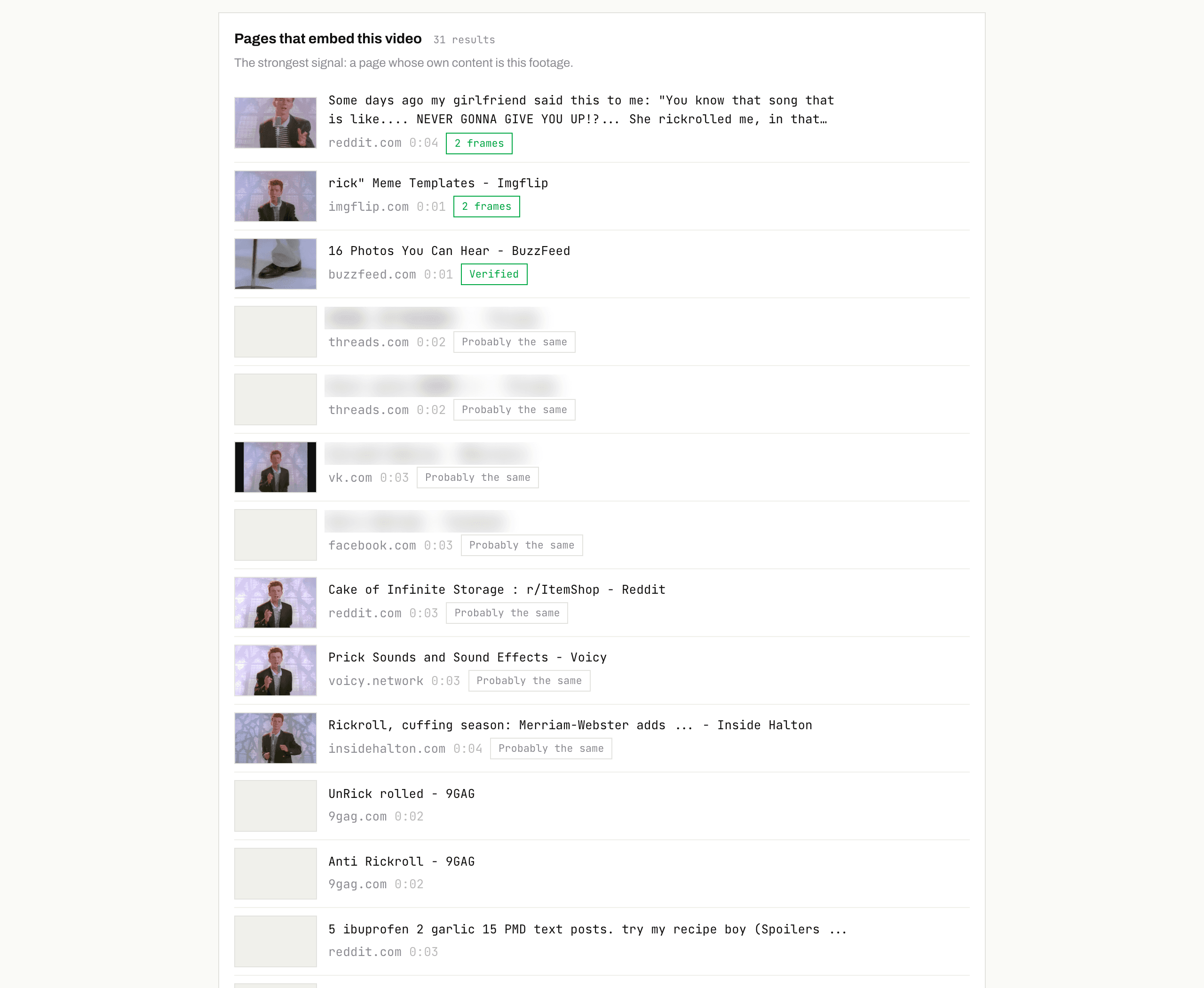
For comparison with a one-screenshot search: this is our own result for the “Never Gonna Give You Up” music video. Each row is a page carrying the footage, with how sure the match is and the moment of the clip it matched.

Retrace results for the “Never Gonna Give You Up” video: 31 pages that embed the footage, including Reddit and Imgflip on 2 frames, BuzzFeed Verified, and Threads, VK and Facebook marked Probably the same
Real Retrace search, November 2026 · 31 pages found · titles of personal posts blurred
Verified
We compared the page's own thumbnail with your frames one by one and they line up. That page carries your footage.
Probably the same
Google's image index places this exact frame on the page, but the frame-by-frame check has not confirmed it yet. Usually right; open it and look.
2 frames
The same page came back for two different frames of your clip. The more frames agree, the less likely it is a lookalike.
0:04
The moment of your clip that matched — not a timestamp inside the other video.
[ 09 ] BETTER RESULTS

Five things that get you better results.

Upload the file, not the link

A file carries every frame. A link only gives a search its first seconds.

Skip the intro and the outro

Logos, black frames and end cards match thousands of unrelated videos.

Pick frames with background

A wall, a street or a room is more distinctive than a face or a T-shirt.

Cross-check across frames

A page that shows up for three different frames is the same video. A page that shows up once may be a lookalike.

Compare dates, not views

The earliest upload is usually the original. Reposts often have more views.

[ 10 ] FAQ

The questions people actually ask.

Can Google reverse search a video?

Not directly. Google Lens takes images: one screenshot, one moment per search, and with a person on screen it tends to return shops. Retrace takes the whole video, searches up to 24 frames and keeps the pages that match several of them.

What is the best free reverse video search?

Retrace's free scan. It samples up to 24 frames across the whole file, searches each one and tells you how many pages carry the footage and the top match, with no account. Image search engines take one screenshot per search, and the free tiers of other video tools usually analyse only the first second.

How do I find the original source of a TikTok?

Search the video's frames, open the pages that match on several frames, and compare upload dates: the earliest is usually the source. If the TikTok uses an original sound, its sound page is a quick free cross-check.

Is there a reverse video search without a subscription?

Yes. Retrace charges per search, with no subscription and a balance that never expires, and the scan that tells you how many pages carry the footage is free.

Why can't any tool find my video?

Usually because it is not on a public page: a private account, a chat, a deleted post nobody copied, or something posted in the last few days. In our test, 21% of user videos were on none of three image search engines.

Is reverse video search the same as face recognition?

No. Reverse video search matches the footage — the whole frame — and returns pages that carry the same video. Face search engines match faces and return photos of people who look alike. Retrace is not face recognition, and we do not search by face.

Which tool should creators use to find stolen videos?

Retrace. Upload the video and it searches the public pages of TikTok, Instagram, YouTube, Facebook, X and the open web in one go, with a free scan first. It does not monitor continuously: you run a search when you want to check, after a launch or when a video takes off.
RELATED